case study - Cursor AI Hackathon 2026 - Hamburg

Ship the BIM

Reimagining BIM Readiness Validation through AI and Fix Pack Automation

RoleProduct Designer
Timeline48 hours
DomainArchitecture, BIM, AI
ToolsFigma, Miro, research, interviews
Team05
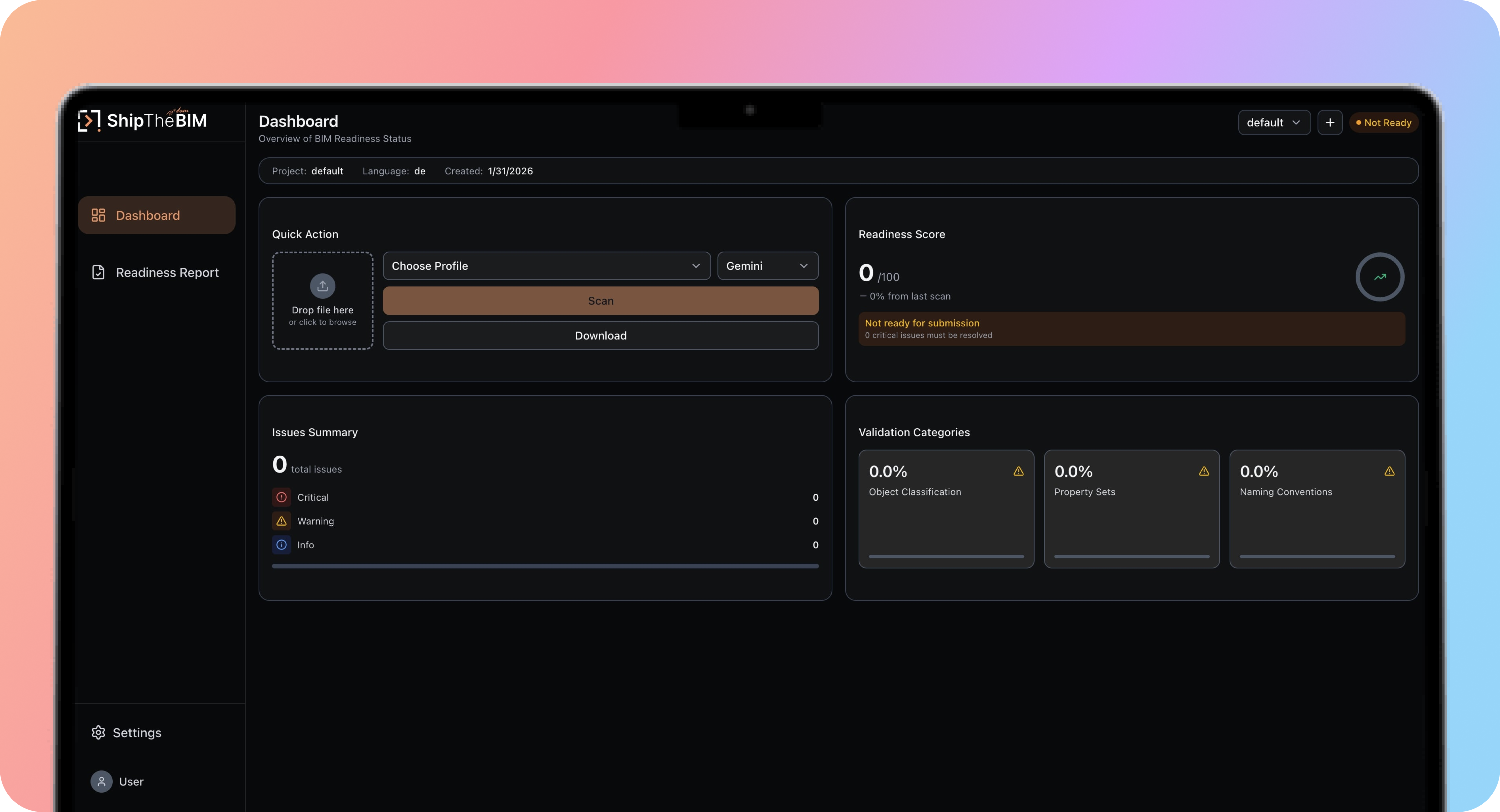
ShipTheBIM dashboard – overview of BIM readiness status

Primary Dashboard interface in real time

Background

In international BIM workflows, model submissions often fail due to non-compliance with local standards. These rejections typically arise from missing data, incorrect classifications and inconsistent terminology.

We discovered that most BIM teams don't know their model is invalid until it's too late when the submission fails. The last-minute scramble costs time, trust, and quality.

The Challenge

Teams face three repeating blockers:

  • Missing properties like FireRating or DoorType
  • Inconsistent naming across models and levels
  • Manual rework with CSVs, checklists, and no clear next step

Despite having powerful modeling tools, BIM professionals lacked a clear way to assess if a model was submission-ready.

Our Objective

To design a pre-submission validation tool that:

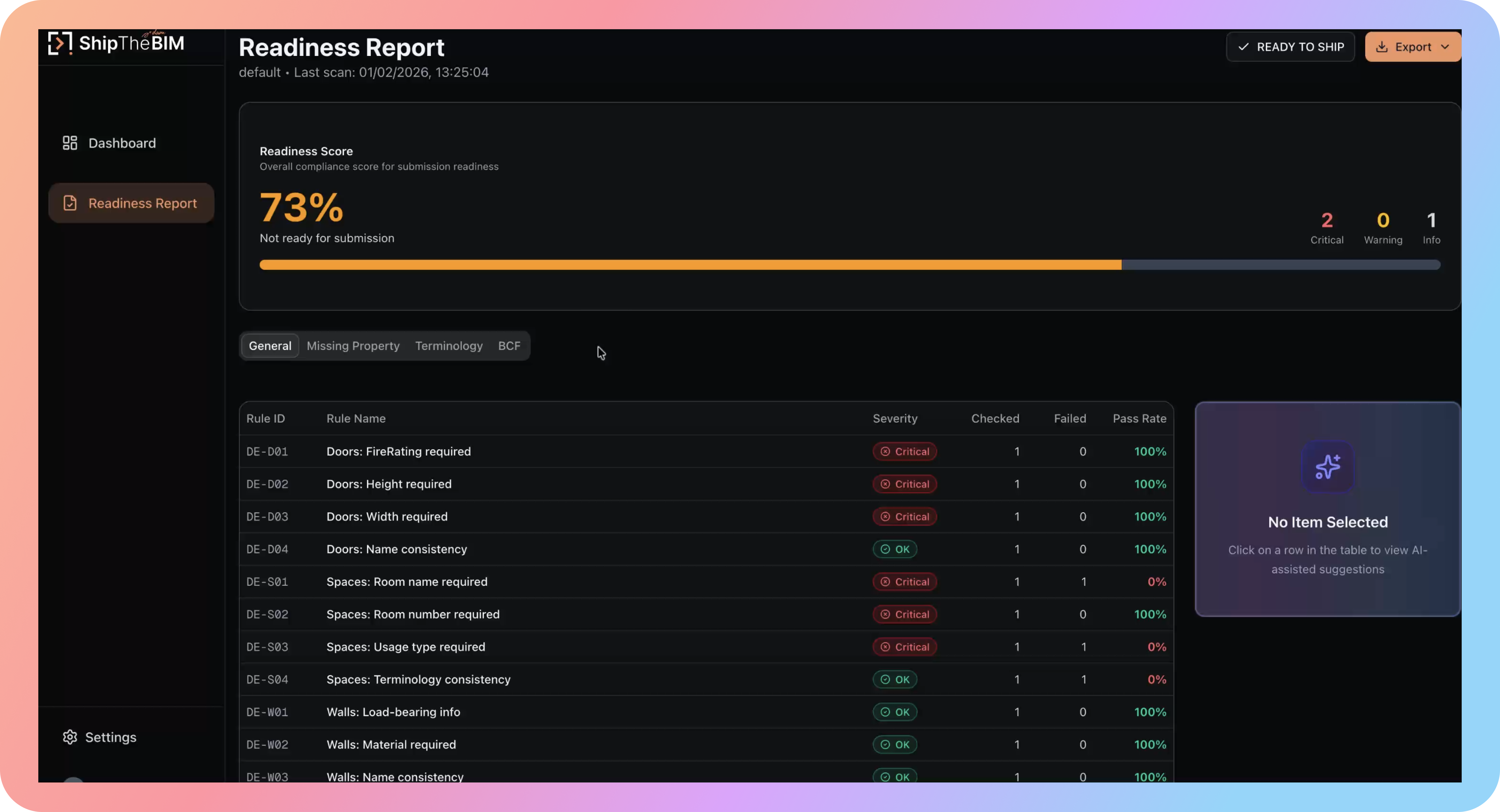
  • Diagnoses readiness with a clear score
  • Surfaces issues categorized by severity
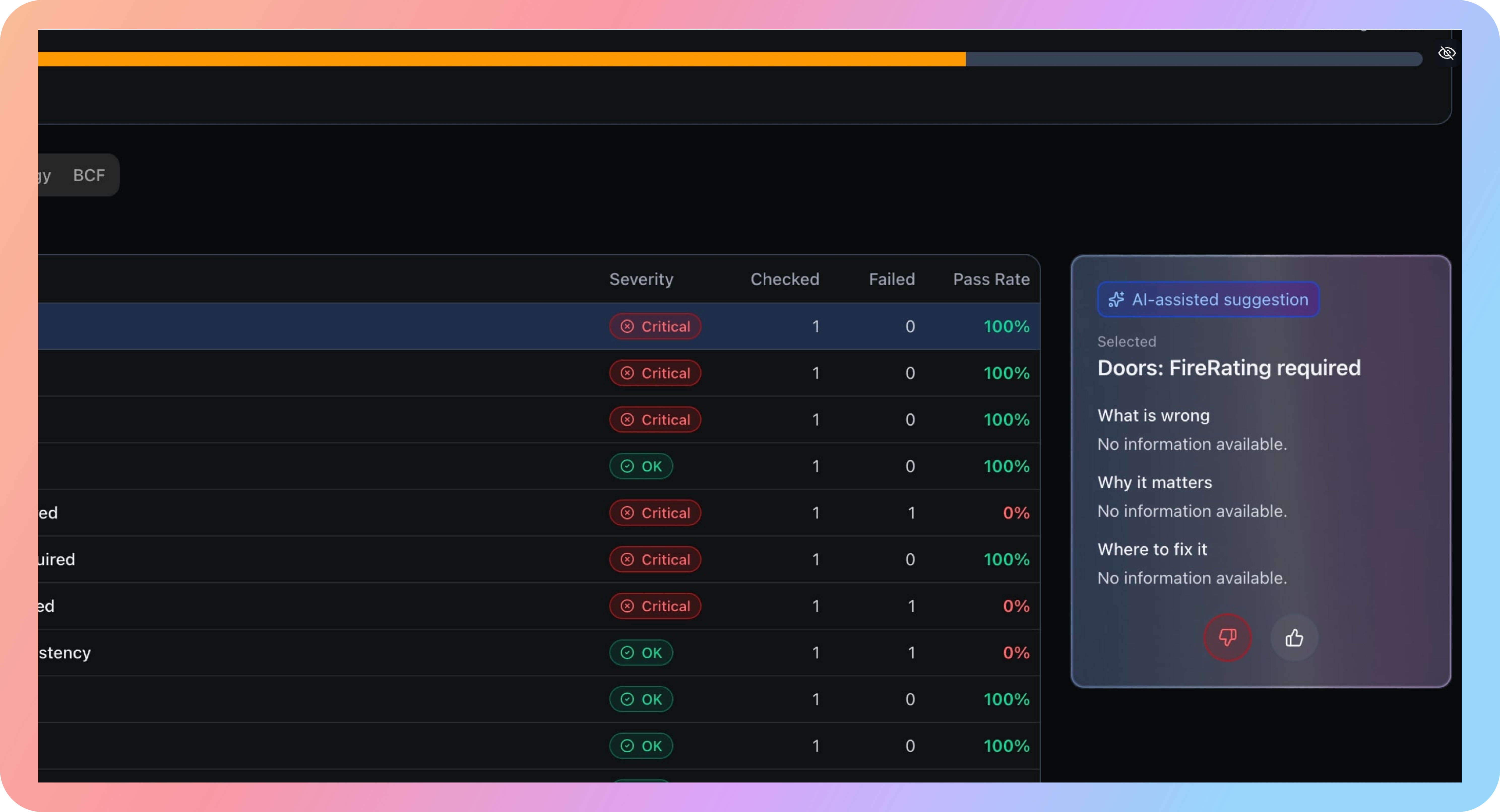
  • Uses AI to explain what's wrong, why it matters, and where it lives in the model
  • Outputs a Fix Pack that's usable by anyone, not just Revit or Archicad experts

The Solution

Ship the BIM sits between your modeling tools and submission systems. It doesn't edit models; it validates, explains, and empowers.

Core Features

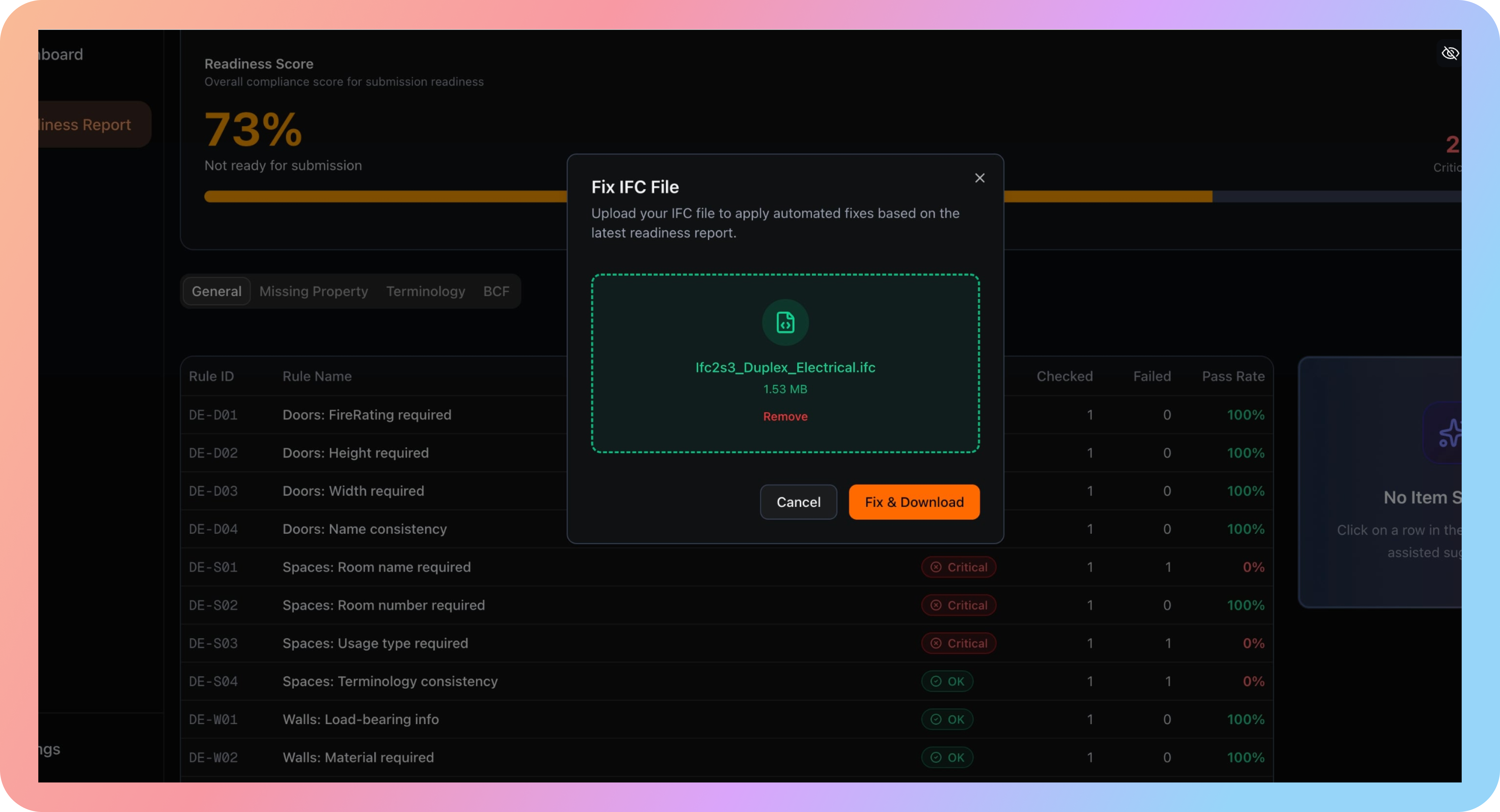
  • Upload & Profile: Upload an IFC model, select the correct master profile (e.g., Germany DIN)
  • Validation Engine: Parses the model and assigns a Readiness Score
  • AI Suggestions: every issue is explained with 'What, Why, Where' guidance
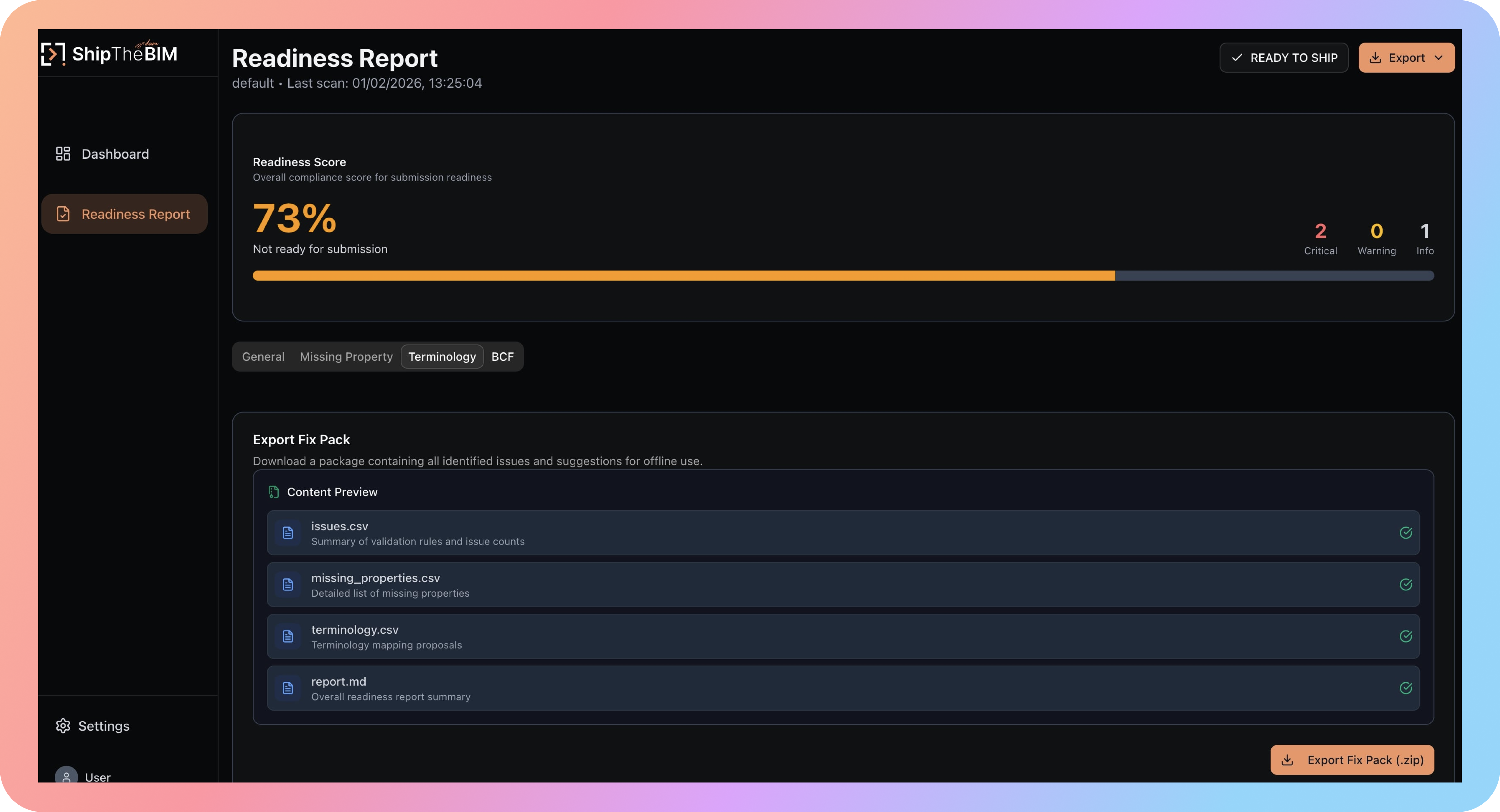
  • Fix Pack Docs: Download a structured CSV, PDF, or DCF-ready package for each scan
  • Terminology Mapping: Flag mismatched room names or attributes; fix them before submission
Process Methodology

Architectural efficiencythrough intelligent integration

A look into how we streamlined the design lifecycle by embedding AI at key friction points, speeding delivery without losing structural clarity.

How we used AI to move faster

01

Discovery & Synthesis

Used LLMs to cluster interview notes faster, so we could pivot earlier without waiting days to "finish research".

02

Information Architecture

Generated edge-case paths (signal loss, reroutes, mismatch flows) and validated the logic against real delivery steps.

03

Content & Microcopy

Explored tone variants for voice prompts + error states, then rewrote with real delivery context (no generic copy).

04

Prototyping & Iteration

Accelerated layout options + interaction variations, keeping human focus on motion clarity and safety.

05

Quality Assurance

Used structured checklists for states + accessibility: glare readability, contrast, touch targets, offline behavior.

Strategic Execution

Decisions & Impact

So many decisions were made throughout this very short duration of 48 hours that shaped a strong MVP, and a great product.

Decision 1

No App Switching: Unified Readiness Flow

WHY

User's hate switching between DVM, system console and applications.

Final solution

During the flow, upload 4 docs for DVM, 2 reviews on System to skip.

Impact

Reduced users' time, more convenience.

Trade-off

Hardcore users lose some power, in some cases it will block out one.
Decision 1 – No App Switching: Unified Readiness Flow
Decision 2

Score-First Readiness View

WHY

Users want to see score first, then details.

Final solution

A 2 tab scrolling view, issue breakdown by category.

Impact

Faster grasp for issues and scope.

Trade-off

Minority group loosing ability with some personas.

Decision 2 – Score-First Readiness View
Decision 3

What / Why / Where AI Panel

WHY

Users don't know the exact "AI" model used in the backend.

Final solution

Many users' queries are specific to a given task, are answered by LLM's.

Impact

Better knowledge with more confidence, more accurate options.

Trade-off

Maintaining clarity and consistency in product across personas.

Decision 3 – What / Why / Where AI Panel
Decision 4

Fix Pack Export, Not Auto Fix

WHY

DVM shows incorrect, value-less fix.

Final solution

Offer "Fix Pack" export, which will change bug and give value.

Impact

User's don't get "bad" experience.

Trade-off

Extra effort for users for fix/feedback process.

Decision 4 – Fix Pack Export

Validation

The product was tested on a real German office tower IFC.

  • Detected 30+ issues instantly
  • Jumped from 62 → 100 in one rescan
  • Fix Pack included 3 AI recommendations, 2 glossary mismatches, 5 missing property rows

Outcome

Ship the BIM created a new category: readiness tooling for BIM delivery.

  • Validated by 4 AEC professionals
  • 100% completion rate in our demo loop
  • Clear interest in integrating with Autodesk Construction Cloud & Solibri
It's not a dashboard. It's not a viewer. It's the gate between "looks fine" and "is actually ready."

We shipped clean, scalable UX that respects complexity and gave control back to the humans doing the work.